removedupes
- version 0.3.1
- Can now compare fields with addresses canonically, i.e. using only the addresses themselves, sorted.
- Updates reflecting Mozilla trunk API changes.
- Visible boolean preference to skip or include special folders in search.
- Can now compare messages by size.
- No longer complaining about saved-search virtual folders.
- Search no longer stalls when encountering local folders with no summary file (although summary file generation is not triggered; this is planned for a future version.)
- version 0.3
- Can now abort search by pressing the Escape key (although key responsiveness during message body comparisons is poor in Thunderbird 2.x and good with Thunderbird 3.x and Seamonkey 2.x).
- Can now choose to search a folder for dupes without including its subfolders in the search.
- Can now mark a set of folders as containing the originals, so that only dupes of these messages are found, and the review dialog marks the 'non-original' copies for deletion.
- Search progress now reported every short while in the status bar.
- Search time-memory balance changed for search including body comparison - now using more memory and significantly less time when comparing many bodies (quicksort instead of Theta(n^2) algorithm).
- Review Dialog: Improved responsiveness when toggling 'keep' status.
- version 0.2.2
- Toolbar button: Added a side-menu for quick-selecting comparison criteria.
- Toolbar button: Button now appears in Seamonkey (well, trunk versions, anyway; I'm having trouble with the 1.1.x versions - help is appreciated).
- Review Dialog: Criteria used in the comparison are now emboldened.
- Review Dialog: Fixed some sorting and sort column indicator issues.
- Review Dialog: You can now include the Message ID and the flags fields as displayed columns.
- Can now use the message status flags as a comparison criteria (read/unread, starred/unstarred, etc.)
- Fixed some locale mis-installation issues (pl-PL with Thunderbird, many locales with Seamonkey release).
- Added pt-BR, he-IL, ru-RU locales; thanks to the Babelzilla translators.
- version 0.2.1
- Review Dialog: Click behavior fixed.
- version 0.2
- Separate-thread work has proven to be somewhat flaky, especially combined with user activity during search, and double-especially combined with work on IMAP folders. So it is out again in this version.
- Messages can now be compared by their bodies, but this comparison is 'rough' and may not work well with multi-part and/or multibyte-character-set messages.
- The extension now works more properly with IMAP and folders, not ignoring subfolders for which headers have not yet been downloaded.
- There is now a button, a Tools menu item, and a keyboard shortcut (Ctrl+Shift+D) for removing duplicates.
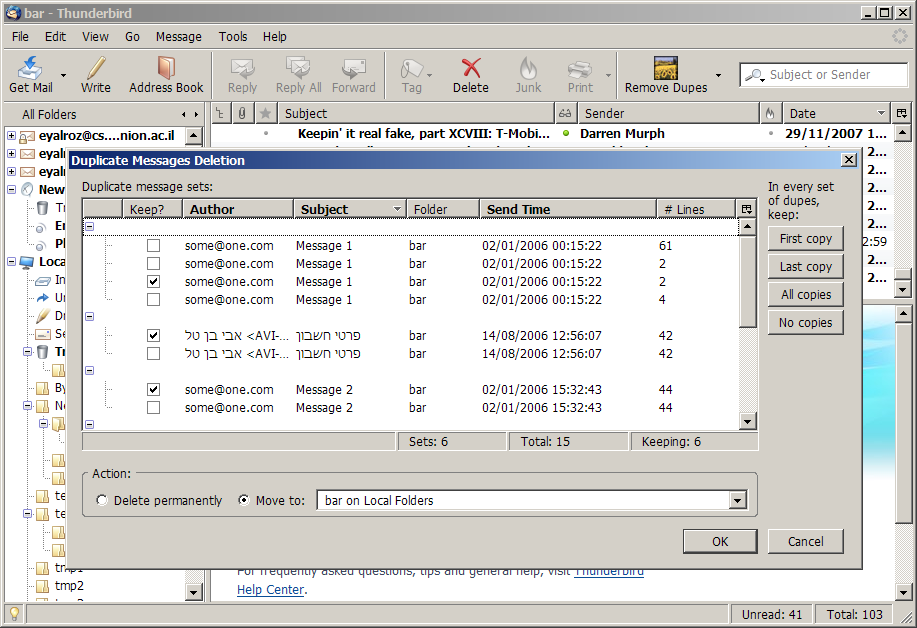
- Review Dialog: The click behavior has changed: Single-click in the checkbox de/selects the message for deletion, single click elsewhere displays the message in the main Thunderbird/MailNews window, and double-click does nothing special.
- Review dialog 'cosmetic' improvements: The sort order is now indicated, and various choices are now persisted (dialog size, sort order, columns being hidden, etc.).
- Review Dialog: 'Last Copy' button added in addition to 'First Copy'.
- Other minor bug fixes.
- version 0.1.5
- The search for duplicates is now done in a separate thread than the main UI thread, so you can continue reading messages or doing other work while searching for dupes.
- Seamonkey: Messages no longer fail to display in the 3-pane window when you click their line in the review dialog.
- Locales now maintained by the kind BabelZilla contributors - see removedupes' page there for a list of locales (we now have Japanese, Traditional Chinese, Slovak, Portugese, Italian, French, Netherlands Dutch and maybe some more).
- Tweaked review dialog mouse click behavior.
- Now informing the user that we're searching for dupes, using the status bar, while s/he is waiting.
- Move to different folder fixed! Can now move dupes to any folder you like; your move target preference is also preserved across uses.
- (Hopefully) No longer trying to search for dupes in non-mail folders (e.g. newsgroups)
- Can now compare messages by their recipient and CC lists.
- Can now sort the dupe sets in the review dialog by the various columns.
- version 0.1.4
- Completely reworked dupe finding algorithm, with x4 and better performance boost:
This version processes ~45,000 messages in 50 folders with ~2800 dupes in ~10 seconds (+ ~5.5 seconds for constructing the review and confirmation dialog).
- Added a sunflower field logo.
- Non-ASCII headers (author, subject) are now handled and displayed properly.
- The review & confirmation dialog now shows the number of total dupes, dupe sets, and dupes to be kept.
- The review & confirmation dialog now has a folder picker for selecting a target folder other than the trash - but, alas, it is not yet working; an alternate folder can be used only by manually editing the hidden pref
removedupes.mail.default_target_folder.
- When single-clicking a message line in the review & confirmation dialog, the message comes up in the main (3-pane) window (this doesn't work in Seamonkey for some reason, though).
- German (de-DE) localization, thanks to
AlfonsName [at] netscape.net and the denizens of #mozilla.de@irc.mozilla.org.
- A message's folder can now also be used as one of the comparison criteria (e.g. to prevent detecting messages from different folders as dupes).
- A message's folder can now also be used as one of the comparison criteria.
- The mechanism for deciding which special folders (Inbox, Trash etc.) to include in a search for dupes has been revamped. It is now controlled by the hidden preference
removedupes.mail.allowed_special_folders.
- version 0.1.3
- Added suiterunner support.
- Can now view messages by clicking their lines in the dupes dialog.
- Compatibile with TB 2.0.
- Partial solution for the problem of non-ASCII message subject and author name.
- version 0.1.2
For questions or comments about removedupes, please send a message to the
removedupes mailing list.
Copyright © 2000-2008. All rights reserved.
Terms of Use &
Privacy Policy.